Disclaimer

Please, proceed carefully following the tips published in this blog, specially when Main Power is involved. I'm not responsible for any damages caused by what is written in this blog.
Thank you
Showing posts with label ethernet shield. Show all posts

Friday, 19 January 2018

Home Automation System - Alarm and OpenHAB...my idea


I can't believe it!!! I reached a little goal...Home Alarm and OpenHAB together...

I know...It seems a simple thing...today home alarm systems can be remote controlled ... but the old ones (as mine is...) don't...

My target was to view the input status of all sensors / radars in my home alarm system...I don't like remote controller...just remote monitoring...

So, it's quite simple: I have to integrate all sensors / radars with a device, as Arduino or similar ones, and gets the input status (OPEN / CLOSE).

I have to know what kind of signal is transmitted by sensors / radars...I discovered the wires from the sensors / radar and with the tester I found the voltage is about 4.5v when the signal is HIGH and 0 when the signal is low.

I made some test with my main entrance door so I confirmed this behaviuor. Door OPEN, 4.5v on the terminal...DOOR closed, 0 voltage.

Now, I have to find a device with at least 11 GPIO 4.5v tolerant

I can choose between:

- a NodeMCU ESP8266 device, with integrated wifi; but it accepts only 4 volts


- an Arduino UNO with ethernet shield, with GPIO 5v tolerant;


The first choice would be the best, because we have integrated wifi and a very small layout...but I have to step down voltage from 4.5v to 3.3v (max)

Otherwise, using Arduino UNO, the voltage is already OK but I need a new shield (ethernet shield)

Idea!!!!!


Raspberry PI3 where OpenHAB and MQTT broker are running, has a lot of GPIO on its board. I could use them. But these GPIO works with 3.3v max. No problem...I will build an interface device with voltage divider...

Then I could use an OpenHAB bindings (see https://github.com/openhab/openhab1-addons/wiki/GPIO-Binding) to manage GPIO, so no needs for an external software...

Summarizing:

 - take all alarm input wires to the Raspberry PI3
 - build an interface to step down voltage from 4.5v to 3.3v
 - download and setup of GPIO binding of OpenHAB (see https://github.com/openhab/openhab1-addons/wiki/GPIO-Binding)
 - make a new sitemap to see the alarm device input

In the next post, I will descrive the operational phase of work

Monday, 28 August 2017

Home Automation System - MQTT and RF433 to monitor photovoltaic production


Now I will try to integrate my RF433 Wireless Receiver (built on Arduino with Ethernet Shield) with MQTT, just to acquire my photovoltaic production data in my future Home Automation System

I don't write nothing more about my acquisition system; this is my old post about that:

http://domoticsduino.blogspot.com/2017/02/rf-433-mhz-data-sniffing.html

Now I would like to transmit data to my MQTT broker, for the future integration with OpenHAB

So, I have to edit the code of the Arduino sketch and let it to publish messages to the MQTT broker. In this time, the receiver publishes data to a HTTP REST Web Service

Well, using Arduino IDE (the same thing used for the SONOFF firmware upload), I open the sketch and edit the code.

I omit the technical details about the code because it's not the purpose of this post, but if you are interested in it, write me an email; I will be happy to share my code with you.

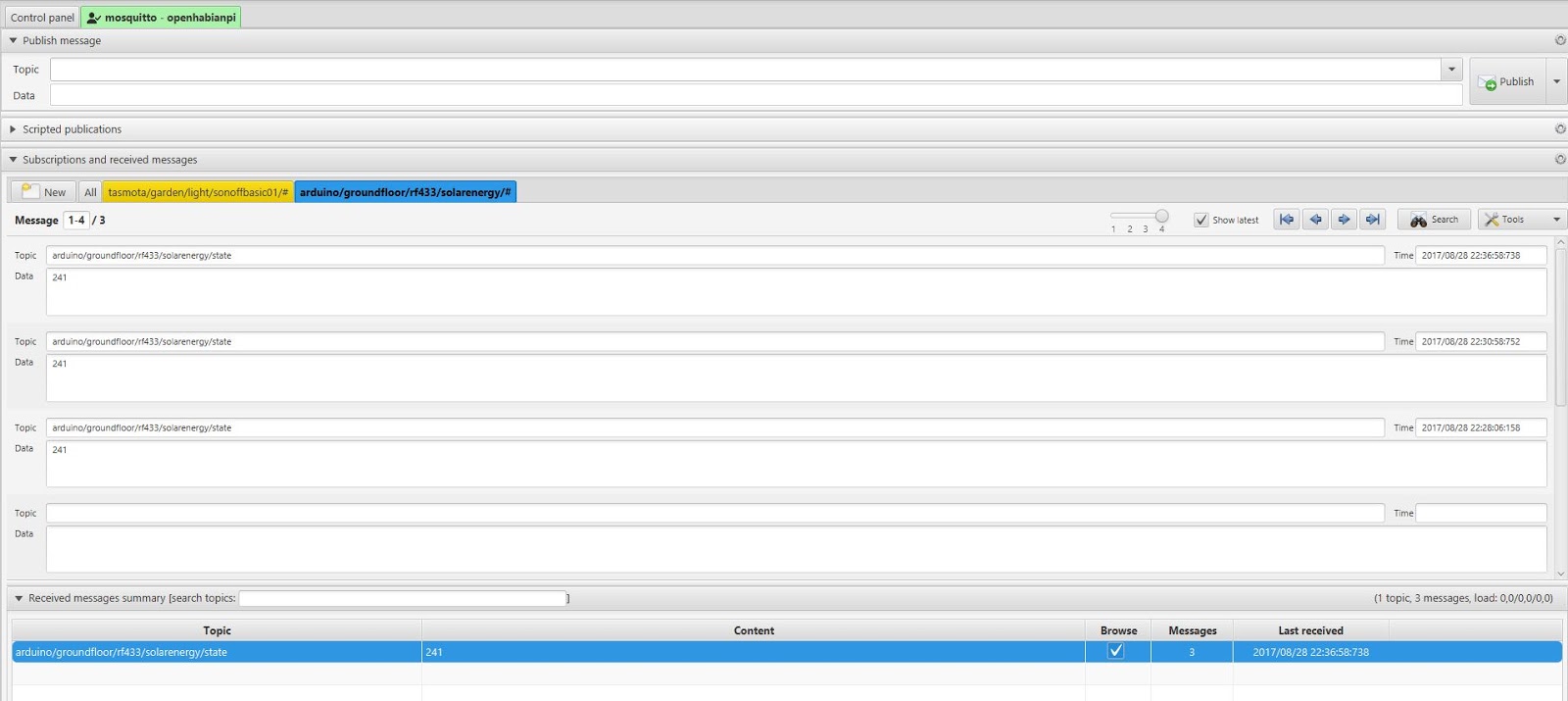
I chose the following MQTT topic:

arduino/groundfloor/rf433/solarenergy/state

I followed the same naming convention as the SONOFF :

[device]/[zone]/[type]/[data id]/state

The content of the message is simply the value of the production in Watt.

Here are the published messages, through mqtt-spy:


And here is the receiver:


Currently it's "mute", but the next step would be adding a led to monitor its status and eventually some environmental sensor...

Stay tuned...


Saturday, 8 August 2015

Data acquisition - The Receiver


Let's get started with the first component: The Receiver.

Here is it still as a prototype


It's made up by an Arduino Uno Board, with the ethernet shield to get network access and the wireless RF433 receiver

Functionality and communication protocols

The wireless receiver receives messages sent by sensors and then route them towards WEB/APP server, using http protocol. It acts as a simple router.

Communication protocols are very simple and currently not secure, so for now this system cannot be in a public network.

The message sent by sensors is a character string made up in the following way:

SENSOR;VALUE;STATUS|

where SENSOR is the name of the sensor; VALUE is the current value of the sensor and STATUS is a particular condition for the sensor (DANGER, WARNING, and so on...)

The receiver gets this string and send it to the WEB/APP server, using the following HTTP GET request:

http://SERVERNAME/data.php?u=PASSWORD&d=STRING

where SERVERNAME is the domain in which WEB App is installed, PASSWORD is a secret key known also by the WEB/APP server and STRING is the sensor's data.

As already said, communication protocol is very simple and without ACK...for now it's just a prototype and it aims only to debug system

HARDWARE

Fritzling Schema (approx)


PIN 2 OUTPUT for RF status led (RED), reporting wireless activity;
PIN 3 OUTPUT for ETH status led (GREEN), reporting ethernet activity;
PIN 5V to power up wireless received and led;
PIN GND linked to wireless receiver GND pin;
PIN 7 INPUT to receive wireless data;

The Ethernet shield is linked to Arduino UNO; all the system is powered up by external 5V.

SOFTWARE

Setup

- wireless receiver setup using RadioHead library;

- ethernet shield setup using standard Ethernet library; it this case we use a static IP (but you can use DHCP if your network provides it);

- status led setup;

Main Loop

- the main thread wait for a wireless message;

- after received a new message, RF status led lights up and the message is sent to WEB/APP server using HTTP request;

- during the http request, ETH status led lights up and it turns off after the HTTP response;

Here you can find source code for the receiver: DOWNLOAD

And here is a video about the receiver doing its job...


Saturday, 1 August 2015

My first project - data acquisition system


I started design my first data-acquisition system with Raspberry PI and Arduino. The idea is to have a sensors network which send data to a receiver which, through ethernet, send these data to WEB/APP server.

The main components are:

- one or more sensors
- a receiver
- a DB Server for storage purpouse
- a WEB/APP server to acquire data and let remote user monitoring the system

Here is the design:


More details:

SENSORS

They can send data in different ways:

- wireless RF-433 towards receiver
- ethernet towards receiver
- USB directly towards server

They can be Arduino board or Raspberry PI or others...
Depending on the type of communication, there can be other interface boards or control led...

RECEIVER

It receives data via wireless RF-433 or via Ethernet
Through ethernet, it transmits data to WEB/APP server, for storage and monitoring purpose

It's built over an Arduino boards with Ethernet Shield and wireless RF-433 receiver. There are also control led.

WEB/APP SERVER

It receives data from receiver through ethernet or from sensor directly connected on its USB port
It stores data on DB server
It runs a web application for remote monitoring

The WEP/APP server software is the world famous Apache HTTPD, installed on Raspberry, running Fedora linux distro.

The monitoring web application is written in PHP / HTML5 using Bootstrap framework, which make it responsive.

DB SERVER

It stores data received from WEB/APP server.

The RDBMS is Mysql Community Edition installed on the same Raspberry of WEB/APP server

Friday, 23 January 2015

Ethernet Shield Test


It's time for the second experiment.
The Ethernet Shield test with Arduino Uno Rev 3.


We will put the shield on the local network and create a simple web server which will reply to http request and will drive two led.

There is a useful library which will help to develop the Ethernet Shield software. With some line of code the device will be on the LAN using DHCP protocol or by setting manual configuration (ip, dns, gateway ...)

The shield will be directly linked to Arduino. Pin 10, 11, 12, 13 are used by the shield and so they cannot be used by developers.

For our purpose, we will link digital output 2 and 8 to two led. Arduino will drive them, receiving http requests. A tablet will be used as client.

Our Arduino will listen on port 80 and will drive the led, managing http requests.

Here is the demo:


Friday, 16 January 2015

Arduino Uno Rev 3 Starter Kit


After many research over the internet, we decided to buy on ebay the Arduino Uno Starter Kit.

We got it in a few days.


It contains:

  • 1 Arduino UNO R3 Board, made in Italy
  • 1 USB Cable 50cm
  • 1 Breadboard 830 points
  • 1 Display LCD 16X2 backlighted, Hitachi HD44780 driver
  • 2 Linear Pots 10Kohm
  • 2 Knobs
  • 1 9V Battery connector
  • 65 Jumpers
  • 10 Buttons
  • 1 Buzzer
  • 1 relay 5V 10A 250VA
  • 1 Temp Sensor LM35
  • 2 Transistor BC547
  • 1 Light Sensor
  • 10 Red LED
  • 10 Yellow LED
  • 10 Blue LED
  • 10 Green LED
  • 10 White LED
  • 1 RGB LED
  • 2 capacitors 4,7uF 100V
  • 5 Diode 1N4007
  • 10 Resistor 1Kohm
  • 10 Resistor 10Kohm
  • 10 Resistor 4,7Kohm
  • 20 Resistor 470ohm

I think we have enough things to begin experiments...

In the same shipping we received also:

RF 433 Mhz Transmitter and receiver modules


Ethernet shield based on W5100 chip with an sd card reader on board


an MQ-4 gas sensor


some RGB LED


Ok, don't waste our time...we are ready to begin some real experiments...